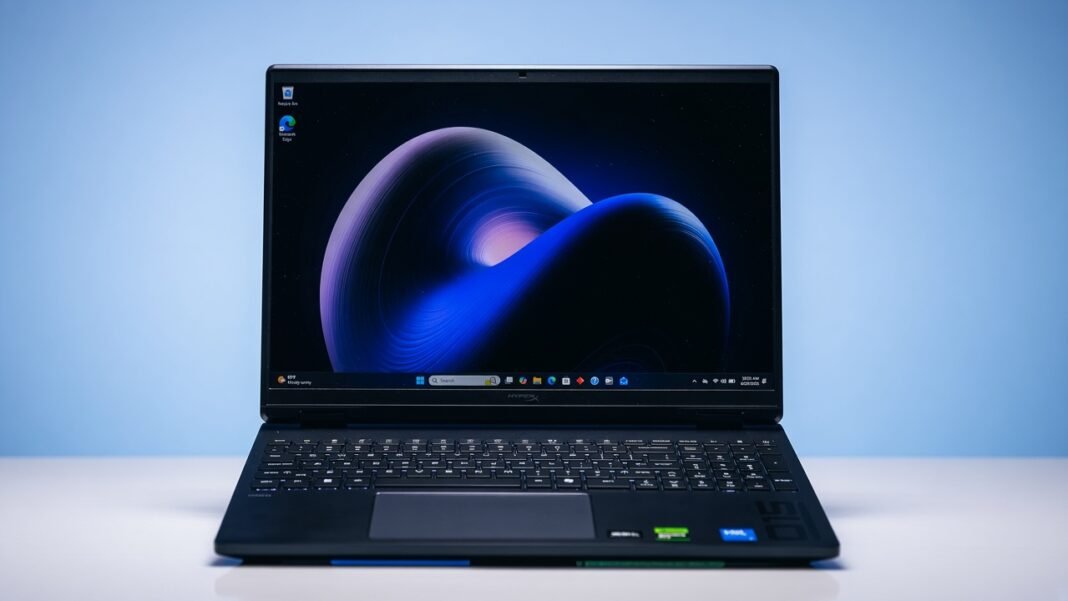

The HyperX Omen 15 is a refined 15-inch gaming laptop that prioritizes smooth 1080p performance, thermal stability, and everyday usability over flashy aesthetics or maximum spec sheet numbers. It targets gamers who want a clean design, strong mid-range GPU performance, and a display that feels responsive without breaking the bank.
Design and Build Quality
The HyperX Omen 15 keeps its exterior understated. You get a slim aluminum chassis with minimal branding, which helps it pass as a work laptop in professional settings while still signaling gaming capability through subtle accents and RGB lighting. The footprint is compact for a 15-inch machine, and the weight distribution feels balanced in the hand and on a desk.
Port selection is practical for a gaming laptop. You typically get USB Type-A and Type-C ports with high-speed data rates, HDMI 2.1 for external displays, a dedicated Ethernet jack for stable online play, and a 3.5 mm audio connector for headsets. Wi‑Fi 6E and Bluetooth 5.3 support ensure fast wireless performance and reliable peripheral connections.
Display: 1080p Focus With High Refresh Options
Many HyperX Omen 15 configurations ship with a 15.3-inch panel around 1920 by 1200 resolution and refresh rates up to 165 Hz, which is ideal for competitive shooters and fast-paced titles where frame rate matters more than pixel density.
Some higher-end models offer sharper 2.5K or OLED screens, but the core 1080p class panel remains the sweet spot for gamers targeting high frame rates on a mid-range GPU like the RTX 5050.
Color coverage on the 1080p IPS options is solid for gaming and general content work, with anti-glare coatings that help in bright rooms. If you plan to do color-critical work, the higher resolution or OLED variants are worth considering, but for pure 1080p gaming, the standard panel delivers smooth motion and low input lag.
HyperX Omen 15 Specs: CPU, GPU, Memory, and Storage
HyperX Omen 15 specs vary by configuration, but the most common 1080p gaming setup pairs an Intel Core 5 210H or Core i7 14650HX processor with an Nvidia GeForce RTX 5050 or RTX 5060 laptop GPU.
The RTX 5050 in particular is tuned for 1080p play, delivering strong frame rates in modern titles when paired with DLSS upscaling.
Memory typically starts at 16 GB DDR5 in dual-channel or single-channel layouts depending on the SKU, with user accessible SODIMM slots that allow upgrades to 32 GB or more for heavy multitasking and future-proofing.
Storage is usually a 512 GB or 1 TB NVMe M.2 SSD, and many models provide a second M.2 slot for adding more capacity without replacing the primary drive.
Gaming Performance at 1080p
In real-world testing, the HyperX Omen 15 with an RTX 5050 consistently hits high frame rates at 1080p in demanding games. Shadow of the Tomb Raider on high settings can exceed 120 FPS at 1080p, while Metro Exodus stress tests show averages well above 140 FPS on RTX presets.
These results make the HyperX Omen 15 a compelling choice for esports and AAA gaming alike when you target 1080p resolution.
Ray tracing is usable at 1080p with DLSS enabled, though you will need to balance visual fidelity and frame rate depending on the title. The 8 GB VRAM on the RTX 5050 and RTX 5060 is adequate for current games at 1080p, especially with texture settings tuned appropriately.
If you plan to push beyond 1080p regularly, the RTX 5060 or RTX 5070 variants provide more headroom, but the RTX 5050 configuration remains a potent 1080p gaming laptop.
Thermals, Noise, and Sustained Performance
Thermal engineering is a standout strength of the HyperX Omen 15. Reviews note effective heat management that keeps CPU and GPU temperatures in check during long gaming sessions, which helps maintain stable frame rates without aggressive throttling.
Fan noise is present under load but generally stays within acceptable limits for a gaming laptop, especially when using a headset.
The cooling solution benefits from a well-vented chassis and intelligent fan curves that prioritize consistency over short bursts of maximum performance. This approach suits players who marathon sessions or stream while gaming, since the system remains predictable rather than spiking in heat and noise.
Keyboard, Trackpad, and Input Experience
The keyboard on the HyperX Omen 15 offers comfortable key travel and good spacing for both gaming and typing. RGB backlighting is customizable through the Omen software, allowing per-key lighting profiles for different games or workflows.
Some units have been reported to use high polling rate keyboards that can cause minor compatibility quirks in certain titles, but these issues are typically addressable via firmware or software updates.
The trackpad is responsive and accurate for everyday navigation, though most gamers will rely on an external mouse for precision play. Palm rest materials feel durable, and the overall input layout avoids unnecessary clutter, which aligns with the laptop’s subtle design language.
Battery Life and Portability
Battery life on the HyperX Omen 15 is respectable for a gaming laptop, especially when you disable high performance modes and lower display brightness for productivity tasks. It is not designed to replace an ultrabook for all-day unplugged use, but it can handle several hours of web browsing, document work, or media playback when needed.
Portability is aided by the slim profile and balanced weight, making the HyperX Omen 15 easy to carry between home, office, and LAN events. The power brick is reasonably sized for its class, and the barrel plug AC input is straightforward, though a USB-C charging option would have been a welcome addition for universal compatibility.
Software, Bloat, and User Experience
HP’s Omen Gaming Hub provides access to performance profiles, fan controls, and RGB customization, which helps tailor the HyperX Omen 15 to different use cases. Some reviewers note preinstalled software that can feel like bloat, but most utilities can be disabled or removed if you prefer a cleaner setup.
Driver support and BIOS updates are generally timely, which is important for maintaining performance and fixing issues like keyboard polling quirks or GPU power behavior. Keeping the system updated ensures you get the best experience from features like DLSS and Dynamic Boost, which shift power between CPU and GPU for optimal frame rates.
Who Should Buy the HyperX Omen 15
The HyperX Omen 15 is ideal for gamers who want a discreet-looking machine that excels at 1080p play without paying for excessive resolution or top-tier GPU power. It suits students, professionals, and content creators who need a single device for work and gaming, thanks to its solid CPU performance, upgradeable memory and storage, and comfortable input experience.
If your primary target is 1440p or 4K gaming, or if you require the absolute highest frame rates in competitive titles, you may want to consider RTX 5060 or RTX 5070 configurations or a laptop with a MUX switch for direct GPU-to-display routing. For most players focused on 1080p, the HyperX Omen 15 delivers a balanced mix of performance, thermals, and everyday usability that justifies its place in the mid-range gaming laptop segment.
My Personal Opinion on the HyperX Omen 15
The HyperX Omen 15 earns its reputation as a subtle yet potent 1080p gaming laptop by combining a clean design, strong RTX 5050 or RTX 5060 performance, and reliable thermal behavior. Its HyperX Omen 15 specs align well with the needs of modern gamers who prioritize smooth frame rates and system stability over raw spec sheet numbers.
For buyers seeking a versatile machine that can game hard at 1080p and still serve as a daily driver for work and study, the HyperX Omen 15 is a compelling option in its price range.